

Context Efficiency
Snapshots are up to 99% smaller than raw HTML, saving thousands of tokens per interaction.
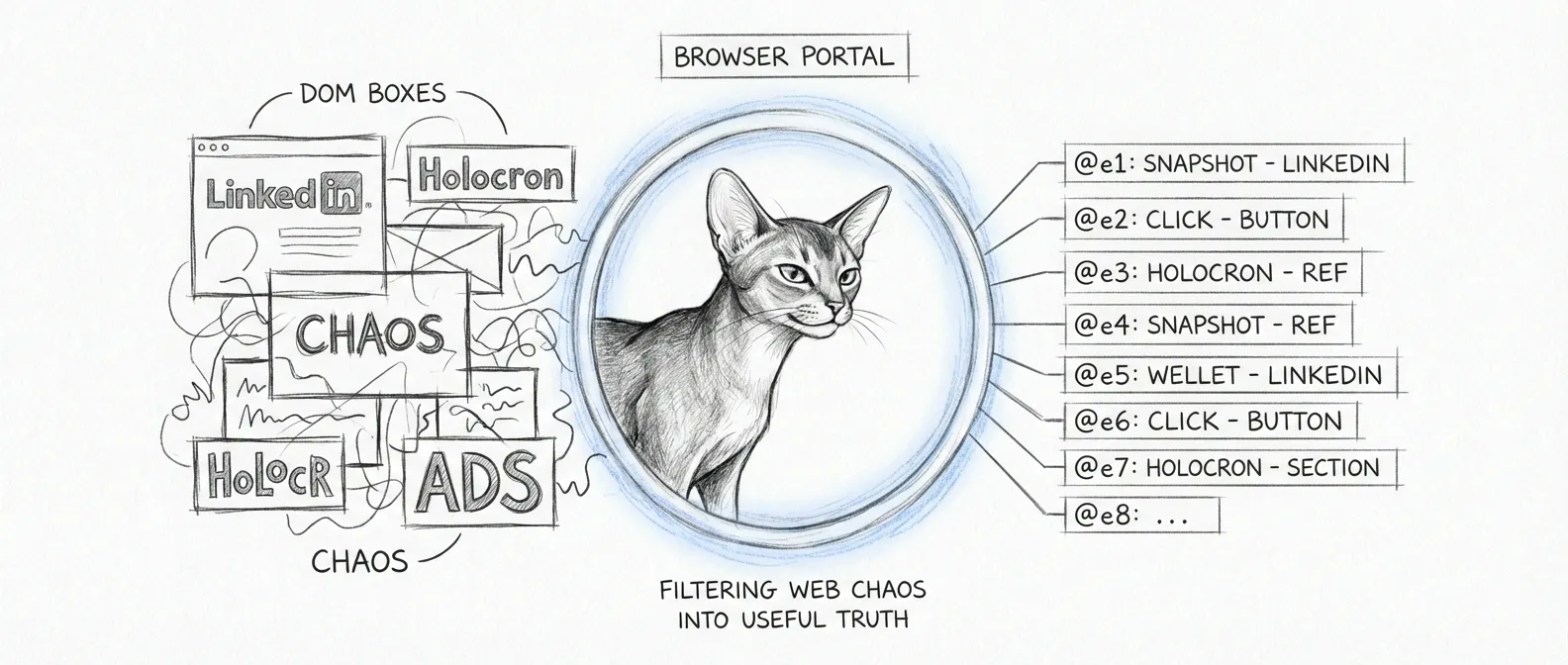
A modern web page does not want to be read. It wants to be rendered. Open LinkedIn with a traditional automation tool and the full DOM comes out screaming — markup, wrappers, accessibility labels, hydration leftovers, and other debris generated by modern frontends that have never once been told “no.” On a page like that, it can easily exceed 50,000 tokens of raw HTML.
The agent needed one sentence of it: “click the blue button and tell me if the page is broken.” In early April 2026, the Council stopped paying for the rest. Browser automation migrated from Playwright to Agent Browser — not to trade one fashionable tool for another, but to replace the full DOM with a snapshot-based reference system that reduces the same interaction surface to a short list of actionable elements.
Context Efficiency
Snapshots are up to 99% smaller than raw HTML, saving thousands of tokens per interaction.
Reference IDs
Elements are assigned short IDs (like @e1, @e2), making interaction simple: agent-browser click @e1.
Native Iframes
Iframe content is automatically inlined into the main tree, eliminating the need for complex frame switching.
Session Persistence
Supports named sessions and encrypted auth states, allowing agents to stay logged into LinkedIn or other services.
The result is not just cheaper automation. It is cleaner reasoning. The agent sees what matters, acts on stable references, and spends less time spiritually trapped inside someone else’s component tree. It is the discipline of Tommy, the haus’s Abyssinian force-ghost: he never read the whole sky to file a weather report. He noted what mattered and ignored the rest.
Every browser task in Sanctum now follows this pattern:
agent-browser open <url>agent-browser snapshot -i to get stable refs like @e1, @e2That last step matters. Browser automation fails most often when a system assumes the previous action probably worked. “Probably” is not a testing strategy. It is an alibi.
The migration affected several parts of Sanctum that were previously paying far too much tax to the DOM gods:
agent-browser with cookie-based session state to monitor selector stability and extract profile names for the Sanctum CRM.The Holocron case is especially useful because it mirrors the actual debugging workflow. When the native app looked fine architecturally but rendered a black pane in practice, agent-browser was the tool that verified the visible UI state instead of politely trusting the theory. See Holocron App for the resulting renderer hardening and packaged app workflow.
This is the least glamorous use of browser automation in the haus, which is probably why it matters.
Claude Code is configured to talk to proxyd at https://127.0.0.1:4040. The proxy, in turn, authenticates Anthropic requests using the anthropic-api-key secret in macOS Keychain. When that token expires, Claude Code does not fail with a noble error message explaining the exact repair path. It throws invalid x-api-key and waits for someone else to grow up.
That someone is tools/refresh_claude_team_token.sh — a standalone tool you run by hand. It is a split-brain repair path: your default browser for the real login, and agent-browser for the hermetic test harness.
There is also an opt-in wrapper at ~/.local/bin/claude-wrapper (installed via tools/install_claude_wrapper.sh) that runs tools/claude_session_preflight.sh ahead of the real binary — but only when you export CLAUDE_TEAM_AUTO_REFRESH=1, and the preflight only nudges you through claude auth login, not the full token dance. Note that a Claude self-update can clobber the ~/.local/bin/claude symlink back to the raw binary, so the wrapper is a convenience, never the load-bearing path. The repair below works regardless.
When you run refresh_claude_team_token.sh --refresh and the Claude Team token is invalid, it:
claude setup-tokenCLAUDE_TEAM_BROWSER_MODE=agent-browser, uses the named session claude-team-oauth to exercise the browser side automatically~/.openclaw/agents/main/agent/auth-profiles.jsonanthropic-api-keylaunchctl kickstart -k on com.sanctum.proxyd, or, if CLAUDE_TEAM_PROXY_RESTART_MARKER is set, drops a marker file and lets a watcher do the bounceThe important design choice is that agent-browser is not trying to become an identity provider. It is there to prove the browser half of the flow works when we need deterministic validation, not to pick a fight with Cloudflare in production.
# Audit current statebash ~/Projects/Claude_Code/tools/refresh_claude_team_token.sh --status
# Force a refresh immediatelybash ~/Projects/Claude_Code/tools/refresh_claude_team_token.sh --refresh
# Exercise the browser-driven E2E harness locallybash ~/Projects/Claude_Code/tests/test-claude-team-refresh-e2e.shThe Holocron e2e suite is built on agent-browser, not Playwright. That decision was not aesthetic. It was because Holocron debugging is about visible state:
That workflow maps naturally to snapshots, screenshots, and named sessions. It does not benefit from importing the entire DOM into the conversation like an overqualified witness who will not stop talking.
The integration is verified by tests/test-agent-browser-e2e.sh, which exercises:
agent-browser is not in PATH, then logs the version (currently 0.19.0).Search element shows up and logging the line count as a density proxy (a snapshot runs tens of lines against ~2000+ for raw DOM).The version and density lines are reported, not yet asserted; a snapshot that quietly bloats to 400 lines would still pass. Pinning those is on the list.
Claude Team repair adds a second browser-specific harness through tests/test-claude-team-refresh-e2e.sh, which validates:
claude setup-token URL capturefile:// auth pageHolocron adds a second layer of validation through tests/holocron-e2e.sh in the app repo, where agent-browser drives the packaged UI path the way a human operator actually would.
None of this makes the web any quieter. Pages will go on screaming their full DOM at anything that opens them, LinkedIn loudest of all. Agent Browser simply stopped making our agents listen to every word — and in a haus where every token is spent from a real budget, choosing what to ignore is the whole job.